Make a Dime Dime Baby AI Video With One Photo
Pick a scene for the entrance, pastry bite and dance exit, then check that the face holds up through all three.
Select the scene and watch the whole beat
Open Dime Dime Baby AI and compare a quince-party take with the garage, garden or studio variations. If the expression is the joke, choose a clear close-up. If the dance matters more, choose a take that shows the body and leaves room for the exit.
Compare the example clips before you generate
Watch the Dime Dime Baby examples once through, then scrub the preview to see where you would pause. Begin with the clip that frames the feature you want viewers to remember. On a second pass, compare how much space each take leaves around that feature as the subject moves. These times and dimensions describe the preview files; check the generator for current settings.
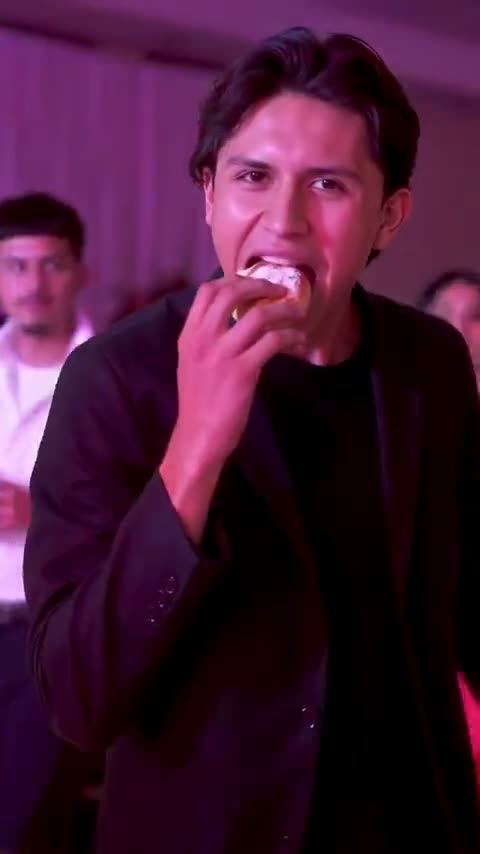
The Quince Guy (480 × 854, 9 seconds)
The quince setup establishes the party before the bite. Check the prop in the first close view. For your opening, look for a clear entrance that shows the setting. Put your own source beside the preview at phone width and check the pastry, jaw and first readable step. If the main detail is already hard to pick out in a still, compare another source or a preview with more separation before generating.
Garden Party (480 × 854, 9 seconds)
The garden lets you compare the jaw and sleeve in a different setting. Save the first frame where the mouth is clear afterward. To plan the pastry bite and direct look, check the frames just before and after the corresponding movement. Note which object or part of the subject first approaches the crop. Keep the last usable frame on either side as a potential trim point.
Dance Studio (480 × 854, 9 seconds)
The studio is useful when the first exit step matters. Compare the last close-up with a wider still before selecting an ending. Work backward from the first clean dance exit. Find a frame that could serve as the cover or the start of the next shot. Check it at the intended viewing size. If the important detail disappears there, test the crop in the edit first.
Upload a photo that supports that shot
Use one clear image of the person, pet or toy you want to feature. The face or muzzle should be visible before a prop is added. For a full-body dance, leave enough room around the legs. Keep the example prompt for the first try and confirm the price or credits shown in the editor.
Prepare the first photo around the action
Put the photo beside the preview and look at what each frame asks the model to show. A face-led opening can work from a close portrait. If the scene then shows footwork, a large arm movement or an important object beside the body, start with the uncropped original or take one wider photo at a similar camera height. Save that file separately so you can go back to the same input after a failed test.
The studio is useful when you care about seeing the exit step. A more crowded party version can give the arrival more context. Use the same photo to compare them. Pause where the pastry and fingers touch, then watch at normal speed to see if the direct look lasts long enough.
For this scene, make the pastry, jaw and first readable step your first check. Open the file at the same width as your draft and see which part of that detail remains clear. If the sample and your source make that check difficult, try a source with clear mouth and a less obstructed bite. Choose material you have permission to use for the finished audience. With two people in an edit, approve the sources separately and identify which shot introduces each person.
Generate around the entrance, bite and exit
- Preview a party take and one simpler setting. Note when the face fills the frame and when the performer moves away. Pick which of those beats carries your intended joke.
- Use one clear photo with the mouth visible. Include more of the body if the dance matters, or show the muzzle and front paws for the pet example. Keep hands away from the face in the source.
- Run the built-in prompt first, using an available setting and checking the quote. If you want one visual change, describe it separately after you see how the standard beat reads.
- Freeze before the bite, after the direct look and during the exit. Check the prop and mouth separately from the dance pose. If only the exit fails, trim or use a wider reference.
Two short prompts to try with the selected scene
Start with the direction supplied by The Quince Guy or the example you picked. For a revision, write what should be visible in shot order. Preserve one subject feature and one main action, then stop. Keep the same scene and source on a prompt test so the result tells you whether the new direction helped.
First pass
Show the subject arriving, taking one bite of sweet bread and looking at the camera. Keep the pastry and fingers distinct. End after one clear dance step.
Read the brief once against the preview and decide which detail does the most work. The first look should tell the viewer who is there, and the move should read at normal speed. If your prompt introduces a second setting, a different person or an extra camera move, take that instruction out for this first pass.
One focused revision
Reduce the size of the bite and keep the eyes visible. Lower the hand after the bite and hold the first clear expression.
When fingers merge with the pastry at the face, test a source with clear mouth and a less obstructed bite and keep the rest of the setup steady. Compare the same action in both takes, using stills if movement makes the difference hard to see. A working first version is also a reference for your next draft. Save its source, chosen scene and short note together.
Check the bite before trimming
Pause just before the bite and as the dancer leaves. If fingers merge with the pastry, try a source with the hands away from the face. If the outfit changes only in the final wide view, try a wider reference or trim to the strongest clear beat.
A garden-party photo with the host in a light shirt is a useful first test. Keep both eyes clear at the stare and inspect the hands as they move away from the pastry. If that moment is stable, try a different scene on the next pass.
What to check at the opening, action and ending
Before the action
Use a clear entrance that shows the setting to check the pastry, jaw and first readable step. Compare the generated frame with your source at the same viewing size. Check that the feature you care about is visible before the subject turns, the camera moves or a prop enters. If it is already missing, work on the input or framing first. A later adjustment has more to build on when the opening already looks right.
At the main beat
Around the pastry bite and direct look, scrub a few frames in both directions. If fingers merge with the pastry at the face, locate the first bad frame and check whether something crosses the subject there. A problem that starts when the hand crosses the face calls for a different correction from a photo that already lacks the right profile. Test a source with clear mouth and a less obstructed bite. Hold the other inputs steady and repeat the same pause on the new output.
After the move
Find the first clean dance exit and decide whether it is a usable final frame or a cut point. Play the full clip at normal speed with the sound muted, then turn the sound back on and play it again. The first pass tells you whether the picture explains the action. The second pass lets you hear whether music or dialogue arrives early enough to make sense without masking the reply. If an action only looks awkward when stepped through frame by frame, judge it in the actual export before rebuilding the shot.
Check the quote and prepare the finished cut
Open the Dime Dime Baby editor, choose the actual scene and settings, and read the quote shown before submitting. You can check Pavo AI Video pricing for plan details. After submission, use the task state to find the result. Review a completed take before starting another one. If you do need another attempt, write down the one change you are testing.
Keep the clean export and make a separate copy for sharing. Check the cover frame and watch the final copy at normal speed. Add a soundtrack or a caption in the edit where you have the rights to use it. Keep any disclosure appropriate to your destination and audience with the version you send, especially when a recognizable person appears in a fictional performance.
Give the exported file one last check for the pastry, jaw and first readable step. If the shot needs another pass, keep the exported baseline so the next change is easy to judge. For a separate worked example or a more focused workflow, read Fix Dime Dime Baby AI When the Bite or Face Looks Off.
Common questions
Which part should I keep if I need a very short clip?
Keep enough of the entrance to introduce the performer, then leave the reaction after the pastry long enough to read. End after the first clean movement if the full exit would delay the payoff.
How do I keep a pet version recognizable?
Start with a dedicated pet scene and use a source with a visible muzzle, ear shape and one coat marking. Review those cues when the prop moves away from the face.