Hotel Lobby AI as a Birthday or Anniversary Video Gift
Design a private performance reveal and keep the surprise in the edit while the people in it approve their photos.
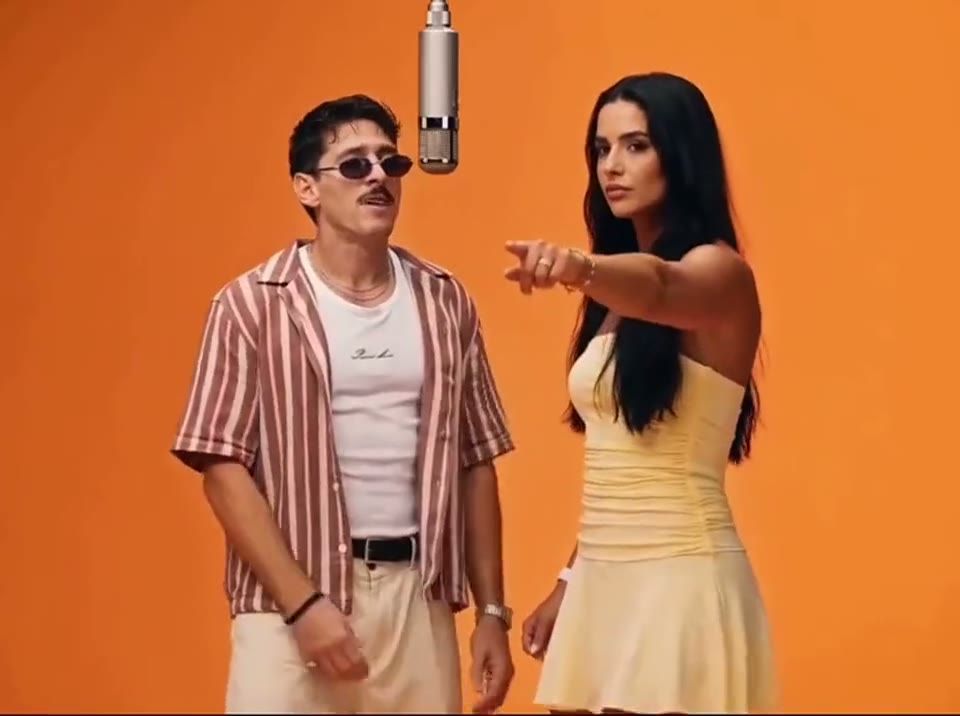
Keep the edit a surprise
You can ask someone to approve a photo for a private birthday or anniversary edit without revealing the gag. If you cannot ask, make yourself the performer and save the recipient’s name for the title card. A shared joke in the caption can make the gift personal with just one recognizable face.
Compare the example clips before you generate
Open the Hotel Lobby examples and scrub through the clips at the approximate size your audience will see. Take a still at the opening, one at the handoff or gesture, and one near the end. Those three stills make a more useful editing plan than a cover image. The dimensions and times below describe the preview files.
Booth Bros (720 × 720, 25 seconds)
Contrasting shirts make this a useful reference for a private two-person gag. Think about which friend should get the setup and who should get the response. For your opening, look for one familiar detail that gives away the performer. Put your own source beside the preview at phone width and check the familiar jacket and the mic handoff. If the main detail is already hard to pick out in a still, compare another source or a preview with more separation before generating.
Leather Couple (540 × 960, 29.8 seconds)
An obvious shared wardrobe works when the recipient will recognize the reference immediately. Keep the first clear smile in the cut. To plan the microphone turn that reveals the joke, check the frames just before and after the corresponding movement. Note which object or part of the subject first approaches the crop. Keep the last usable frame on either side as a potential trim point.
Blazer and Flannel (540 × 960, 29.8 seconds)
A blazer is a cleaner choice when a recognizable outfit matters. Find a face frame you can use immediately before the birthday card. Work backward from a private dedication for the recipient. Find a frame that could serve as the cover or the start of the next shot. Check it at the intended viewing size. If the important detail disappears there, test the crop in the edit first.
Choose a scene that reads as a gift
Preview the booth and outfit variants in Hotel Lobby AI. A familiar jacket can anchor the joke more clearly than elaborate styling. Use one unobstructed portrait for the lead. If you want two distinct performers, make a short clip for each approved photo and alternate them at the mic.
Plan the cut before making the shots
Draw three boxes in a note and label them opening, reply and ending. For each one, write whose shot it is, where that person looks and what information it adds. You can mix a generated lead, a real reaction shot you have permission to use and a plain card. The three boxes give you a way to deliver the idea even when a single generated scene cannot keep all the performers separate.
Start with an outfit the recipient associates with a real story, like the jacket from a shared trip. The microphone turn gives you a natural cut into a dedication. Use the same nickname the two of you use in messages. Share the first version privately if the humor depends on something personal.
For this scene, make the familiar jacket and the mic handoff your first check. Open the file at the same width as your draft and see which part of that detail remains clear. If the sample and your source make that check difficult, try a closer source and an earlier cut to the dedication. Choose material you have permission to use for the finished audience. With two people in an edit, approve the sources separately and identify which shot introduces each person.
Plan a gift in three moments
- Pick the one thing that makes the gift personal, such as a familiar jacket, a shared place, or the group’s nickname. Use it as the thread between the opening and end card.
- Ask for permission for the specific photo and audience. To keep the gag hidden, share the idea of a private video gift and keep the final cut and caption for the reveal.
- Use the booth scene to establish the performer, then cut to a short reaction or message. If both partners should appear, keep the photo references and video takes separate.
- Hold the dedication just long enough for the recipient to read. Send the full-size export privately and keep an uncropped copy in case you adapt the gift to a different screen.
Two briefs you can paste into your edit notes
Use these as shot notes. For a generation, carry over the part that describes one visible action and match it to the scene already selected. Keep your text cards, edit points and soundtrack on separate tracks. This makes it easy to compare a tighter cut or a different ending without asking the model to rebuild material that already works.
First pass
Use the recognizable jacket in the opening frame. Cut on the mic turn to the recipient's approved reply or a short private dedication.
Put the first shot and its reply next to each other on the timeline. Watch until you can tell who is acting and what the other shot adds. When you have a clear sequence, bring in a line of text or the permitted audio. Set the picture rhythm first so there is room to reposition the caption later.
One focused revision
Hold the first face long enough to recognize it. End the performance cut before the face turns away, then show the dedication on a still card.
When the face becomes hard to identify during the turn, build a second draft around a closer source and an earlier cut to the dedication. Keep the strongest opening. Cut to a separate response or a simple end frame where the original action stops being useful. Play both drafts side by side and see which one would make sense to someone who never saw the example.
Deliver a private version first
Watch the result for unwanted gestures and mouth drift before sending it. Add a simple dedication at the end, and avoid a public tag until the recipient has seen the joke. Keep an uncaptioned copy in case you want to change the dedication or crop later.
For a private birthday delivery, begin with a familiar jacket on the performer, cut at the mic turn and end with an inside joke. If you plan to post later, export a second cut with names and personal details removed and confirm that everyone shown agrees.
What to check at the opening, action and ending
Before the action
Use one familiar detail that gives away the performer to check the familiar jacket and the mic handoff. Compare the generated frame with your source at the same viewing size. Check that the feature you care about is visible before the subject turns, the camera moves or a prop enters. If it is already missing, work on the input or framing first. A later adjustment has more to build on when the opening already looks right.
At the main beat
Around the microphone turn that reveals the joke, watch once with the picture filling the intended screen and once with a wider crop. If the face becomes hard to identify during the turn, try a closer source and an earlier cut to the dedication. Mark the end of the useful action and see if the next shot still follows naturally. An edit can solve a timing or framing problem while preserving a performance that already works.
After the move
Find a private dedication for the recipient and decide whether it is a usable final frame or a cut point. Play the full clip at normal speed with the sound muted, then turn the sound back on and play it again. The first pass tells you whether the picture explains the action. The second pass lets you hear whether music or dialogue arrives early enough to make sense without masking the reply. If an action only looks awkward when stepped through frame by frame, judge it in the actual export before rebuilding the shot.
Check the quote and prepare the finished cut
Open the Hotel Lobby editor, choose the actual scene and settings, and read the quote shown before submitting. You can check Pavo AI Video pricing for plan details. After submission, use the task state to find the result. Review a completed take before starting another one. If you do need another attempt, write down the one change you are testing.
Keep a copy of the clean file, then make a posting or delivery version. Add any date, reply action or dedication as text you can move independently. Preview it on the destination screen. If the message has to travel outside the video as well, send the relevant details in the accompanying text so viewers can find them after playback.
Give the exported file one last check for the familiar jacket and the mic handoff. If the shot needs another pass, keep the exported baseline so the next change is easy to judge. For a separate worked example or a more focused workflow, read Make a Hotel Lobby AI Video From Your Photo.
Common questions
What can I do if I cannot ask for their photo?
Use your own image for the performance and make the gift personal through the dedication or a spoken greeting. A real memory you both share can do more work than a likeness they did not choose to share.
How long should the reveal take?
Keep enough of the booth to see the microphone and the first clear reaction. If the lead is recognizable early, you can cut as soon as the gesture resolves. Check whether the recipient could understand the point with the sound off.